


Rozetka dropshipping integration module with BAS / 1C via API endpoints
If you are a Rozetka supplier, this module automates the entire dropshipping order cycle in your accounting system. Orders come in automatically, documents are generated automatically, and returns are processed without any action on your part.
Estimated cost: Upon request
What the module automates
New dropshipping orders from Rozetka are automatically imported into BAS/1C via API-complete with all details: product category, quantity, purchase price, customer contact information, and delivery address. No manual copying from the supplier’s dashboard is required.
Every day, the system automatically generates an incoming invoice and a delivery note for all shipments made that day and sends them to the supplier via EDI. Sales documents for the customer are also generated automatically once the product serial numbers are received.
The module tracks the status of waybills for each shipment. If a customer hasn't picked up their order, the system automatically initiates the return process and generates all necessary documents between Rozetka and the supplier. You don't need to do anything manually.
What the full dropshipping cycle looks like
Flowchart of the interaction between Rozetka and the supplier. The entire process shown in the diagram is automated by a module on the side of your BAS/1C accounting system.
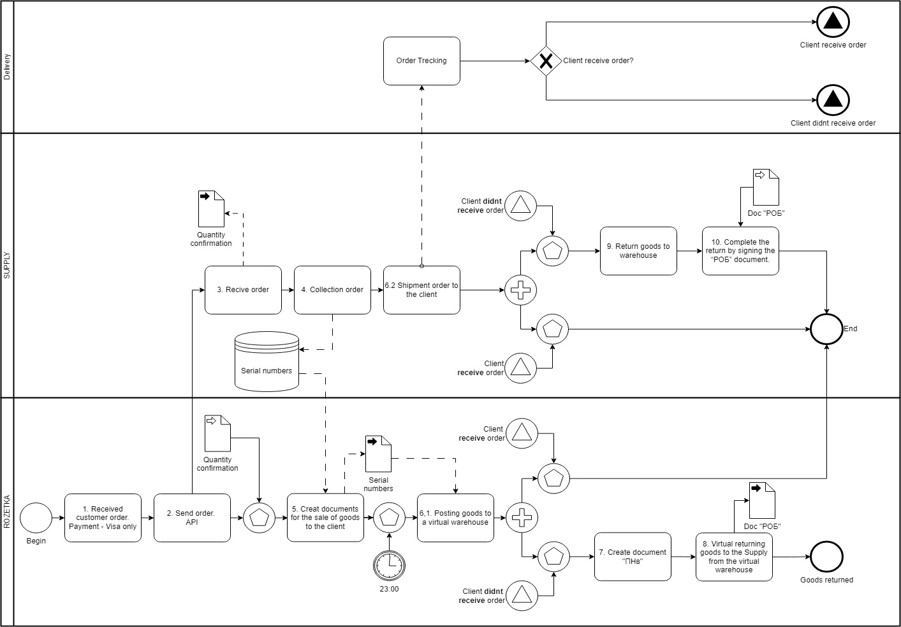
Rozetka receives an order from the customer and processes payment—prepayment only (credit card, OCH credit, Rozetka card). The order details, including the product list, customer contact information, and delivery address, are then sent to the supplier via API. The supplier confirms product availability—also via API. Once confirmed, the order is locked and cannot be edited by the customer.
The supplier picks the order at the warehouse and transmits the product serial numbers and waybill via API. Based on this data, Rozetka generates sales documents and sends them to the supplier—these are included in the package sent to the customer. At the same time, the product is added to Rozetka’s virtual warehouse, and purchase documents are generated and transmitted via EDI.
If the customer does not pick up the package, a return document is automatically generated for the return of the goods from the customer to the dropshipping virtual warehouse. A return document (ROB) is then generated for the supplier. The goods are physically returned from Nova Poshta directly to the supplier’s warehouse. To complete the process, the supplier signs the ROB document.
How to connect the module
Determine which products will be sold via dropshipping (the entire product range or a portion of it). Sign a dropshipping agreement with Rozetka. For an existing supplier, create a duplicate of the counterparty with the tag _Dropshipping. For a new supplier, create a new counterparty directly with the correct name.
We configure the structure in the accounting system: a separate SLA for the supplier (mask Dropshipping_*supplier number*), a separate product folder in the catalog, and a price list in SSC Tools linked to the _Dropshipping_ counterparty. New products are then automatically assigned to the correct groups.
We connect the module to the Rozetka API. We test all endpoints: order creation, confirmation, editing, tracking, document transfer, cancellation, and returns. We launch the system only after thorough testing.
After launch, we provide ongoing support for the integration—helping with changes to the Rozetka API, BAS/1C updates, or any unusual situations that arise during operation.
API endpoints - what the module handles
The module is built on the REST API specification provided by Rozetka to suppliers. All requests and responses are in JSON format. Below is a complete list of endpoints with examples.
| Method | Endpoint | Purpose |
|---|---|---|
| POST | /order/create | Creating a new order |
| PUT | /order/edit/{guid} | Editing an existing order |
| DELETE | /order/cancel/{guid} | Order Cancellation |
| GET | /order/status/{guid} | Check Status + Waybill |
| POST | /order/{guid}/upload | File transfer (PDF documents) |
| DELETE | /file/{file_guid}/delete | Deleting a file |
Placing an order
The order is received from Rozetka, including the complete product list, customer information, and delivery address.
{
“header”: {
“partnerOrderId”: “123e4567-e89b-12d3-a456-426614174000”,
“comment”: “Коментар клієнта з сайту”,
“deliveryAddresType”: “DropShipping”,
“cashOnDelivery”: 0,
“deliveryCompanyName”: “Нова Пошта”,
“deliveryAddressId”: “NP_BRANCH_001”,
“CustomerName”: “Іван Петренко”,
“deliveryCity”: “Київ”,
“deliveryPhone”: “+380501234567”,
“deliveryStreet”: “вул. Хрещатик, 1”
},
“products”: [
{
“supplier_code”: “SUP12345”,
“RZ_code”: 11254855,
“quantity”: 2,
“price”: 100.50
},
{
“supplier_code”: “SUP12346”,
“RZ_code”: 11254800,
“quantity”: 1,
“price”: 250.00
}
]
}
{
“guid”: “123e4567-e89b-12d3-a456-426614174000”,
“status”: “pending”
}
{
“error”: “Недійсні дані замовлення”
}
Order Cancellation
guid – a unique order identifier.
{
“partnerOrderId”: “123e4567-e89b-12d3-a456-426614174000”,
“status”: “canceled”
}
{
“error”: “Замовлення не знайдено”
}
Edit Order
When the order is updated, the entire order inventory is transferred.
{
“deliveryAddresType”: “DropShipping”,
“cashOnDelivery”: 0,
“deliveryCompanyName”: “Нова Пошта”,
“CustomerName”: “Іван Петренко”,
“deliveryCity”: “Київ”,
“deliveryPhone”: “+380501234567”,
“deliveryStreet”: “вул. Хрещатик, 1”,
“products”: [
{
“supplier_code”: “SUP12345”,
“RZ_code”: 11254855,
“price”: 100.50,
“quantity”: 2
}
]
}
{
“partnerOrderId”: “123e4567-e89b-12d3-a456-426614174000”,
“status”: “pending”
}
Check Order Status
{
“guid”: “123e4567-e89b-12d3-a456-426614174000”,
“status”: “shipped”,
“tracking_number”: “track-12345”,
“products”: [
{
“supplier_code”: “SUP12345”,
“RZ_code”: 11254855,
“quantity”: 2,
“reservedQuantity”: 2,
“SerialNumber”: [“SDSS2122221212”, “SDSA11221122233”]
}
]
}
Можливі статуси:
created – Замовлення прийнято в обробку
updated – Замовлення відредаговано
shipped – Відвантажено, є номер ТТН
File Upload
Transmission of PDF documents (invoices, receipts) as binary data.
POST /order/123e4567-e89b-12d3-a456-426614174000/upload
Content-Type: application/octet-stream
[binary PDF data]
{
“success”: true,
“file_guid”: “abc12345-e89b-12d3-a456-426614174001”,
“message”: “Файл успішно завантажено”
}
Error Handling:
401 – Invalid or missing API key
400 – Invalid request format or missing parameters
404 – Resource not found
500 – General server error
Deleting a file
Transmission of PDF documents (invoices, receipts) as binary data.
DELETE /file/abc12345-e89b-12d3-a456-426614174001/delete
{
“success”: true,
“message”: “Файл успішно видалено”
}
Tools available for dropshipping orders
Payment (supported by the module):
Доставка
Rozetka Dropshipping with BAS/1C Automation – Why It Matters
At first glance, dropshipping through Rozetka seems simple: the marketplace receives orders and payments, while you ship the product directly to the customer. But when the number of orders reaches dozens or hundreds per day, the lack of proper integration with the accounting system quickly turns everything into chaos. Manually transferring every order, manually creating documents, constantly monitoring shipping statuses and returns – all of this consumes time and leads to mistakes.
Our module solves this problem completely. It connects to the Rozetka API and handles the entire routine workflow: orders are automatically imported into BAS/1C, stock availability confirmations are sent through the API, documents are generated and transferred via EDI without any manual actions. TTN tracking is automatic. Returns are automated as well.
How Work with Counterparties Is Organized in BAS/1C
One of the important points that is often underestimated is the correct counterparty structure inside the accounting system. For every supplier working under a dropshipping scheme, a separate counterparty is created with the _Dropshipping suffix in the name – for example, SupplierName_Dropshipping.
This is not just a formality but a necessity: dropshipping operations and regular purchases from the same supplier must be clearly separated in accounting to avoid confusion in documents, price lists, and reports.
If the supplier already exists in the system, a duplicate counterparty is created. If the supplier is new, it is created immediately with the correct name. The price list in SSC Tools is also linked separately to the dropshipping counterparty.
The delivery schedule in the counterparty card is configured by the purchasing department or left as default. Important: the delivery schedule for auto-purchase forecasting is not configured for dropshipping.
SLA, Product Folders, and Mapping – What Is Configured in ERP
For each dropshipping supplier, a separate SLA is created in ERP using the mask Dropshipping_*supplier number from the ERP directory* – for example, Dropshipping_28790441.
This is necessary so that new products from this supplier are automatically assigned to the correct groups in ERP and Goods, without manual sorting.
At the same time, a separate folder is created in the catalog for this supplier’s dropshipping products – for example, CategoryName_Dropshipping.
Existing products are manually moved into this folder through SSC Tools, while new products are automatically assigned there after mapping is configured. Merchant settings are also updated through Tools: Merchant 109 Dropshipping is assigned to dropshipping products.
If installment payments or credit options need to be enabled for dropshipping products, a reserve delta is configured for the new folder.
Nova Poshta and the Business Account for Dropshipping
Another important aspect is logistics. For each dropshipping supplier, Rozetka creates a separate Nova Poshta business account using the counterparty name in the format Rozetka_*supplier number* – for example, Rozetka_28790441.
Through this account, the supplier generates TTNs for shipping products to customers.
Currently, two shipping options are available:
- Calling a Nova Poshta courier to the supplier’s warehouse with automatic TTN registry generation
- Self-shipping from a Nova Poshta branch
The supplier courier delivery option is currently under development and will appear during the second stage of implementation.
What Happens with Documents During Shipment
After the supplier transfers product serial numbers through the API Rozetka generates sales documents for the customer order and sends them to the supplier. These documents are then included inside the package.
Every day at 23:00, a supplier purchase document – an incoming invoice – is automatically generated. It includes all products shipped or scheduled for shipment during that day.
This document is automatically sent to the supplier through EDI electronic document exchange. At the same time, a goods receipt note is automatically created and also sent to the supplier for signing.
This entire chain works without any manual actions on your side. The module handles everything automatically, every day, at the same time.
How Returns Are Processed
Returns in dropshipping are a separate and fairly non-trivial process.
If the customer does not pick up the product from the branch or delivery address, a customer return document is automatically created for the virtual dropshipping warehouse.
Physically, the product is returned by Nova Poshta directly to the supplier’s warehouse, bypassing Rozetka completely.
After that, a supplier return document – ROB – is automatically generated. This is especially important for suppliers whose contracts do not formally allow product returns: the document legally records the return correctly.
To complete the process, the supplier must sign the ROB document. Once signed, the return is considered closed.
What Makes This Module Different from Manual Operations
The main difference is not simply that “data is transferred into the system,” but that the entire business logic of the process is implemented inside the module itself.
The module understands that after receiving serial numbers, it must generate sales documents. It knows that purchase documents for the day must be closed at 23:00. It knows that if the customer fails to pick up the package, the return process and ROB document generation must be started automatically.
None of these steps require your involvement.
Who This Module Is Designed For
The module was developed for Rozetka suppliers who use BAS or 1C for accounting and want to automate the dropshipping workflow without hiring additional staff for manual data entry.
It is suitable both for new suppliers who are just signing a dropshipping agreement and for existing suppliers, with minimal changes to the current ERP structure.
If you already have an existing integration with Rozetka using another workflow, we can connect the module without interrupting your operations.
If you are just getting started, we will consult you and guide you through the entire process – from signing the contract to receiving your first order.