


Additional tabs on BAS document forms
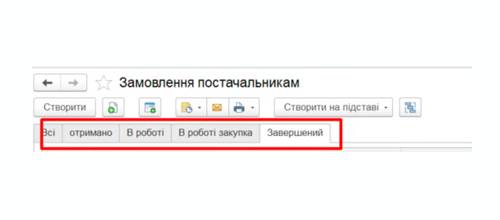
Customizing list forms in BAS MB: We add filter tabs based on document status-“In Progress,” “Completed,” “Received,” and any other statuses tailored to your process. Choose from a ready-made solution or a custom development tailored to your company’s specific needs from IntegraBAS.
Estimated cost: 2 500 ₴
What Changes After Implementation
Where is this used?
Customer orders, supplier orders, delivery notes, invoices, and work completion reports—you can add tabs to any list form in BAS MB. Status names and filtering logic are customized to fit your actual workflow, rather than the system’s standard options.
Frequently Asked Questions
Why Additional Tabs on BAS Forms Are Useful
When there are hundreds of documents in the system – finding the right ones without proper filtering becomes a daily problem. The standard list in BAS shows everything at once, and every time you have to manually set filters by status or date. A small thing – but it eats up time every day for every employee.
After the customization by IntegraBAS, tabs by document state appear above the document list. Switch tabs – see only what you need. New orders in one place, in-progress in another, completed separately. No need to explain anything to colleagues and no need to configure filters from scratch every time.
Ready-Made Solution or Tailored to Your Process
If your process is standard – we implement it quickly and without unnecessary costs. If you have specific statuses, multiple document types or a non-standard configuration – we develop it to fit your needs. In both cases, the customization does not conflict with BAS updates and does not affect the standard configuration.
After implementation, IntegraBAS conducts a brief walkthrough – so the team can start using it right away rather than figuring it out on their own. This usually takes 10-15 minutes.
A Small Improvement – A Noticeable Impact
These things don’t look like a major project, but in practice they change how people work with the system every day. Fewer unnecessary actions, fewer questions between colleagues, less time spent searching for the right document. It’s exactly these small improvements that add up to a properly functioning accounting system.